
Release Notes - 12/9/2025
Closing Messages
When a lead says they've found another venue or are no longer interested, VenueAI now gives you the option to automatically send a graceful goodbye, keeping the door open if plans change.
How It Works
- A lead indicates they're no longer interested or chose another venue
- VenueAI stops AI follow-ups for that conversation
- If closing messages is enabled, a closing message is sent to the lead
- If their plans fall through, they know you're still there
The message goes out on the same channel the lead used — text for text, email for email.
Setting It Up
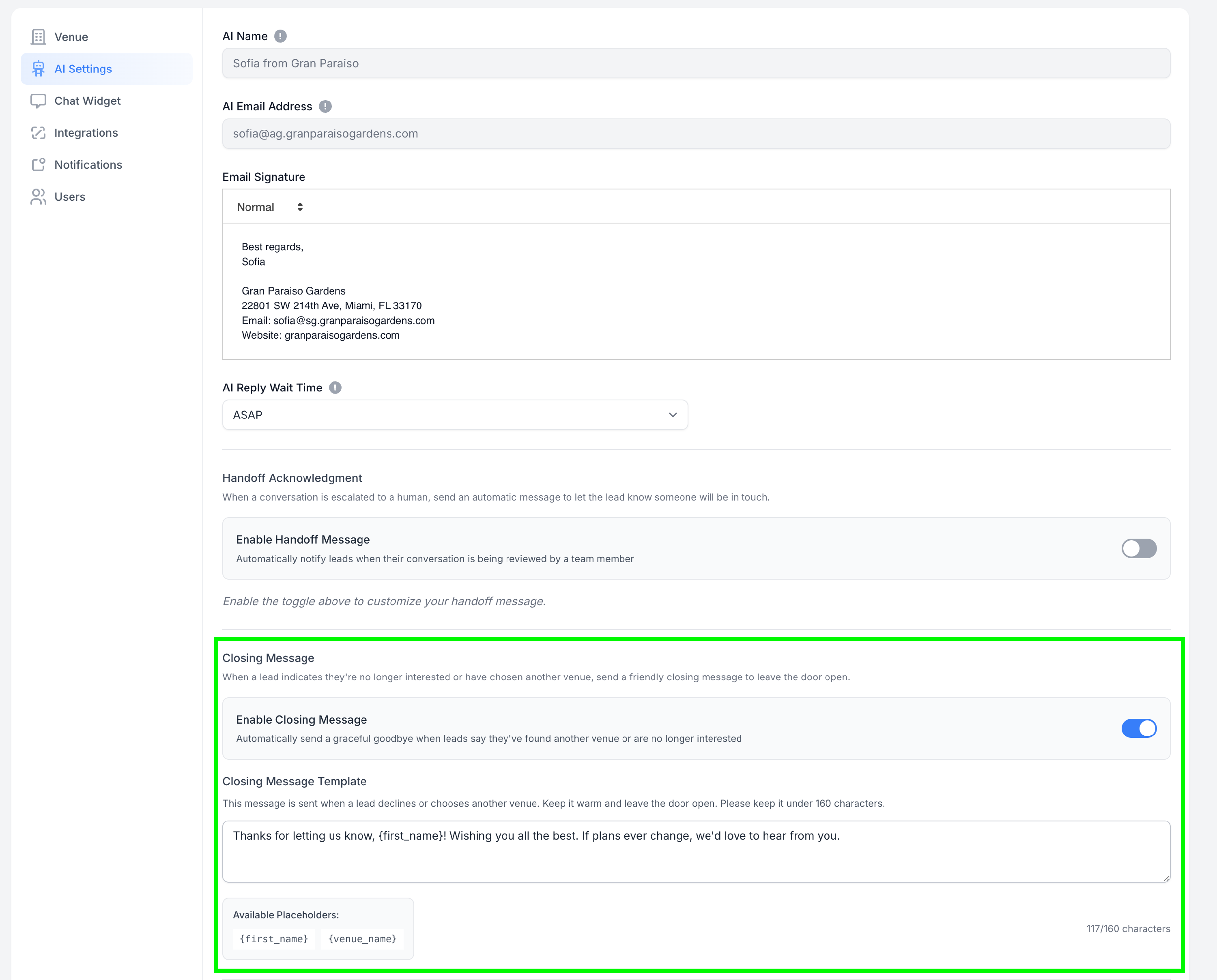
- Go to Settings → AI Settings
- Scroll to Closing Message
- Toggle it on
- Customize your message or use the default
- Save
Customizing Your Message
Use these placeholders to personalize:
{first_name}— The lead's first name{venue_name}— Your venue's name
Example:
Thanks for letting us know, {first_name}! Wishing you all the best. If plans ever change, we'd love to hear from you.
Keep it under 160 characters for SMS.
Why Use It?
A warm send-off leaves a good impression — and plans do change. First-choice venues fall through, contracts get canceled, couples change their minds. A graceful goodbye keeps you top of mind without being pushy.
Questions? Reach out to our team anytime.
See our other release notes here: https://help.venueai.com/collection/164-release-notes